
Desktop edition · Windows
XLTable Desktop for Windows
Turn your warehouse tables into Excel PivotTables — and ask questions about them in a chat. Free, no license required. Runs entirely on your machine: no data leaves your network*, no server to deploy, no admin rights required.
* Fully — in the Excel scenario. In the AI chat, cube answers go into the model’s context; connect a local MCP model and nothing leaves your network at all.
Version 2.1.1, released September 7, 2026 · Changelog
SHA-256 9B2DBCAF30AB650B967D83F6073B2D6C664BEB4A73D3DFEA82B8E64DCDA1CC0C
Prefer a portable copy? Download the .zip · ~147 MB
SHA-256 7F9A43C4E208A4036FEED38EF76378463043CAA32749FBD1B0EA27E8CF941C26
SELECT region, quarter, SUM(sales_amount)2.0B rowsClickHouse0.3s
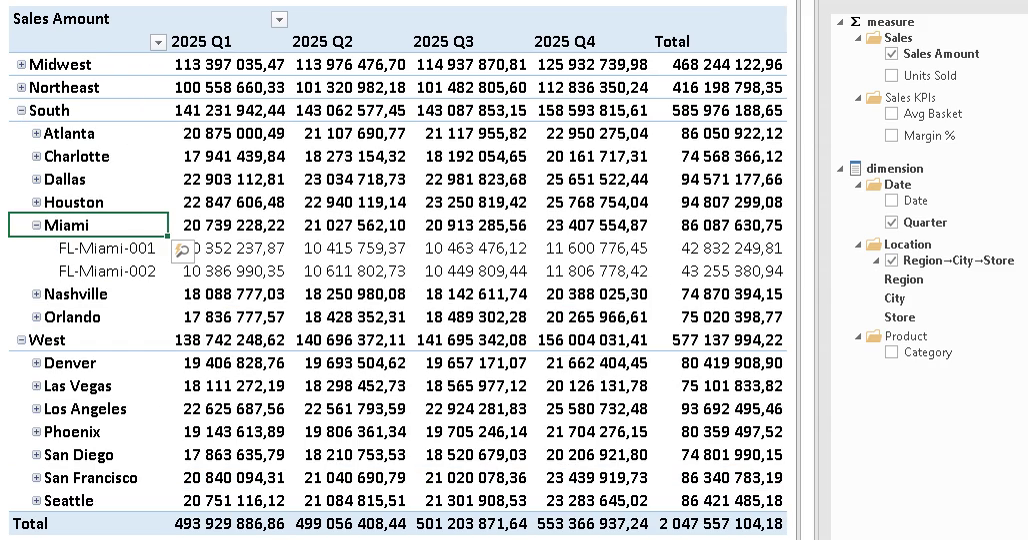
Excel PivotTable · live over XMLAno data copies · on-prem
SQL · Cubes
Build the model yourself — no backlog
A cube is a set of plain SQL queries — no DAX, no YAML, no new modeling language. XLTable generates the first cube from any table in about five seconds; then refine it yourself: different granularities in one cube, no VLOOKUP glue. Your idea doesn’t have to wait in someone else’s backlog.
AI · MCP
AI on your cubes — not on your database
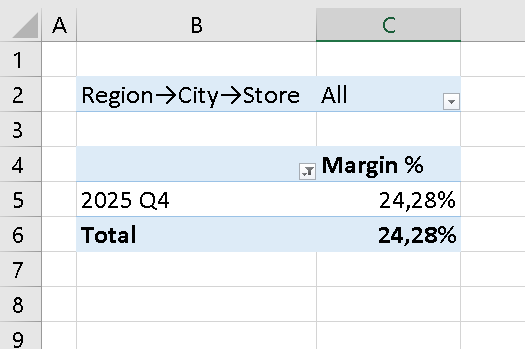
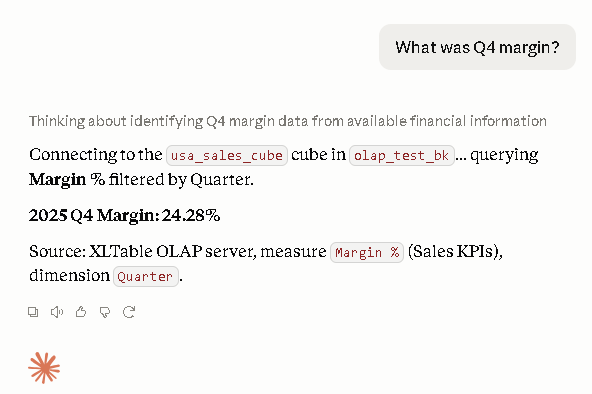
XLTable connects Claude and other MCP assistants to your cubes; the OLAP server runs on your laptop. The agent never touches the database — it sees only the cube: the aggregates you chose to expose, and exactly those reach the AI context, nothing else. And the cube keeps the agent honest: no improvised SQL — one question, one number, the same number your PivotTable shows.
Claude Desktop · any MCP-compatible assistant
Want to hear about new versions and useful guides? Leave your email — we’ll write when there’s something worth your time:
By clicking the button, you accept the terms of the Data Privacy Policy.
What you need before you start
- Access to your data warehouse — host, user and password (the same credentials you use in DBeaver or DataGrip). ClickHouse, BigQuery, Snowflake, Trino, StarRocks, Greenplum, Databricks and DuckDB are supported.
- Microsoft Excel (365 or 2016+) with the Analysis Services provider — it ships with Office in most installations.
- Windows 10 or 11. Administrator rights are NOT required: XLTable installs into your user profile.
What happens after you install
XLTable opens the Quick start page in your browser and walks you through four steps: connect the warehouse, generate your first cube from any table, connect Excel, connect an AI chat client. The first PivotTable usually takes about ten minutes.
“Windows protected your PC”
Until our code signing certificate is in place, Windows SmartScreen shows a warning for the installer, because the publisher cannot be verified automatically. Click “More info” → “Run anyway”. If you downloaded the .zip instead, right-click it → Properties → Unblock BEFORE extracting.
Free and paid
The free edition is a single-user desktop: it listens on 127.0.0.1 only, keeps cubes as .sql files in your Documents folder, and needs no license. Cube files work unchanged on the paid XLTable server, which adds a shared cube catalog, row-level security, SSO and multi-user access. Learn about the server edition →
Questions you’ll probably ask
- Won’t security shut this down?
- It’s a personal tool, like DBeaver — not a deployment. It installs per-user, no admin rights. XLTable itself sends nothing outside — check it through a proxy.
- Will the agent see all my data?
- The agent doesn’t connect to the database — only to the cube. What goes into the cube is your call: leave the names out, and the agent never sees them.
- I can already point Claude at the database over MCP.
- You can. But an agent with raw SQL improvises a new query every time — the numbers drift. On top of a cube it computes by the model: one question, one number, and the same number shows in your PivotTable.
- How is this better than Power Pivot?
- Power Pivot is a snapshot of data inside a file. XLTable queries the database live: the model lives outside the file, the data never goes stale, and the same cube is what the AI agent reads.
“How do you do that?”
At first it’s just your tool: you installed it, you asked nobody. A week in, you have the model your team was waiting for — and numbers that agree in Excel and in the chat. Colleagues will come asking on their own. You’ll be ready.
Docs: xltable-olap.readthedocs.io/en/latest/quickstart.html · Support: help@xltable.com · https://t.me/XLTable